
Download Ridersmate – free sports app for Mac
What is Ridersmate? – A Quick Overview
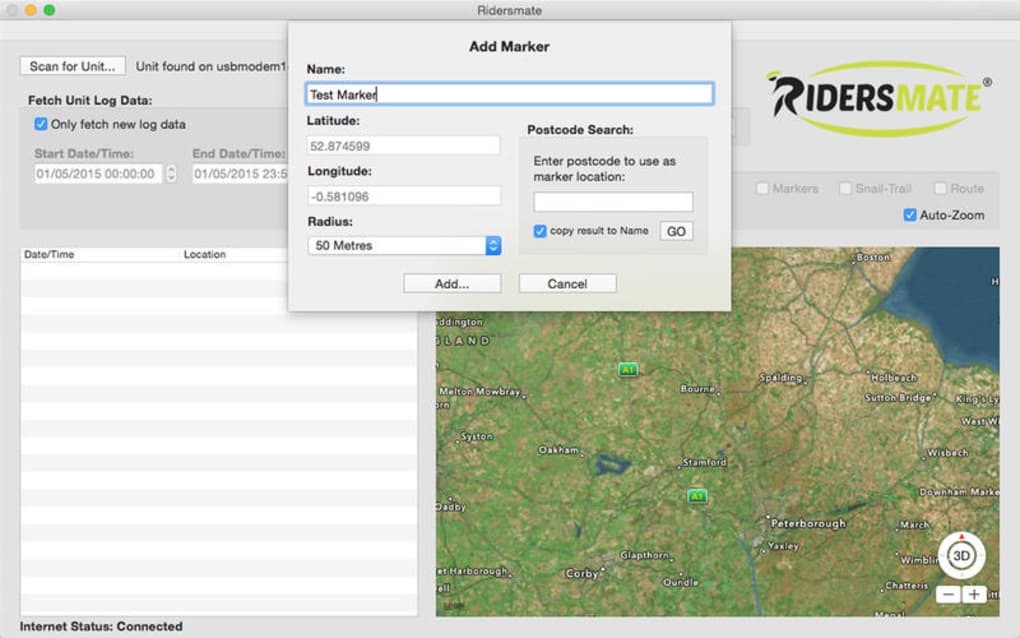
Ridersmate is a free, lightweight sports‑focused program designed exclusively for macOS. Developed by the seasoned software creator Clive Minnican, this English‑language application targets cycling enthusiasts, horse‑riders, and anyone who enjoys tracking outdoor activities on a Mac. While many fitness tools are built for iOS or Windows, Ridersmate fills a niche by offering a native macOS experience that blends real‑time data capture, route planning, and performance analytics into a single, easy‑to‑use interface.
The app’s primary goal is to provide riders with a secure, offline‑first platform where they can log mileage, monitor heart‑rate zones, and compare training sessions without needing an internet connection. Because it’s free, Ridersmate eliminates the barrier of costly subscriptions that dominate the sports‑software market. Users can download the installer directly from the developer’s website, and the program follows Apple’s security standards, ensuring that the app is notarized and safe to run on modern macOS versions.
Beyond basic tracking, Ridersmate includes a community hub where riders can share routes, compete in weekly challenges, and export data in popular formats such as GPX, TCX, and CSV. The program also integrates with Apple Health, allowing seamless synchronization of activity metrics across devices. Whether you’re a casual weekend rider or a competitive athlete, Ridersmate offers a flexible, no‑cost solution that respects your privacy and runs smoothly on your Mac.
Key Features That Set Ridersmate Apart
- Offline Route Recording: Capture GPS data without an internet connection, perfect for remote trails.
- Multi‑Sport Support: Track cycling, horseback riding, mountain biking, and running from a single dashboard.
- Real‑Time Metrics: View speed, distance, elevation gain, and heart‑rate zones live on the screen.
- Apple Health Sync: Automatic two‑way synchronization keeps your Mac and iPhone health data aligned.
- Customizable Training Plans: Choose from pre‑built plans or create your own based on distance, duration, or intensity.
- Data Export Options: Export rides in GPX, TCX, or CSV for use with other analysis tools.
- Community Challenges: Join weekly leaderboards, share routes, and earn virtual badges.
- Secure Notarized Build: Fully signed by Apple, guaranteeing safety on macOS Catalina and later.
- Lightweight UI: Minimalist design reduces CPU usage, extending battery life on laptops.
- Multi‑Language Ready: While the default language is English, the architecture allows easy localization.
Each feature has been crafted with the Mac ecosystem in mind. For example, the offline route recorder leverages the Mac’s built‑in location services, ensuring accurate waypoint logging even when Wi‑Fi or cellular signals are unavailable. The community challenges are powered by a lightweight cloud API that respects user privacy; no personal identifiers are stored beyond an optional anonymous nickname.
Ridersmate’s training plans are adaptable, letting you set target distances (e.g., 50 km per week) or focus on specific intensity zones (e.g., 80 % of max heart rate). The app then suggests rides that match your goals, and you can adjust the difficulty with a simple slider. This level of personalization is rare in free macOS sports apps, making Ridersmate a compelling alternative to paid platforms.
Finally, the data export capability ensures that you’re never locked into a proprietary format. Whether you need to analyze your performance in third‑party software like TrainingPeaks or simply share a GPX file with friends, Ridersmate makes the process effortless.
How to Install Ridersmate and What Systems It Supports
Getting Ridersmate up and running on your Mac is straightforward. Follow these steps for a smooth installation:
- Visit the official Ridersmate download page (hosted on a secure HTTPS server).
- Click the Download for macOS button; the file is a .dmg disk image.
- Once the download completes, open the .dmg and drag the Ridersmate icon into your
/Applicationsfolder. - If macOS warns you about an unidentified developer, open System Preferences → Security & Privacy → General and click “Open Anyway.” The app is notarized, so this step is only required on the first launch.
- Launch Ridersmate, grant location permissions when prompted, and you’re ready to start tracking.
Ridersmate is optimized for macOS 10.15 Catalina and later, including Big Sur, Monterey, Ventura, and the newest Sonoma release. The application runs natively on both Intel‑based Macs and Apple Silicon (M1, M2, and later) thanks to universal binary packaging. Users have reported consistent performance on MacBook Air models, even when the battery is below 20 %.
From a compatibility standpoint, Ridersmate interacts seamlessly with the following macOS components:
- CoreLocation – for accurate GPS tracking.
- HealthKit – to sync heart‑rate data with Apple Health.
- System Notifications – for real‑time alerts on distance milestones.
- Dark Mode – automatically adapts the UI based on system preferences.
Because Ridersmate is a desktop‑first app, it does not require any additional drivers or third‑party plugins. The installer also includes a brief “First‑Run Wizard” that walks you through configuring default units (kilometers vs. miles), selecting a preferred heart‑rate monitor, and opting into community features. If you already use a Bluetooth heart‑rate strap, the wizard will pair it automatically during setup.
Should you encounter any issues, the developer provides a dedicated support email and a public GitHub repository for bug reports. Updates are delivered through the built‑in updater, which checks for new versions weekly and prompts you to install with a single click—ensuring you always have the latest features and security patches.
Final Verdict: Should You Download Ridersmate?
Pros
- Completely free with no hidden subscription fees.
- Native macOS performance on both Intel and Apple Silicon.
- Robust offline GPS recording for remote rides.
- Deep integration with Apple Health and system notifications.
- Extensive export options (GPX, TCX, CSV) for data portability.
- Active community challenges that add motivation.
- Lightweight UI that conserves battery life.
Cons
- Limited to macOS – no Windows or Android version currently.
- No built‑in video analysis or advanced cadence metrics.
- Community features require an internet connection.
- Customization of UI themes beyond Light/Dark mode is not available.
- Support is primarily email‑based; no live chat.
Frequently Asked Questions
Is Ridersmate truly free, or are there hidden costs?
Ridersmate is 100 % free to download and use. All core features, including offline tracking and data export, are available without a subscription. Optional in‑app purchases for premium themes are not currently offered.
Can I sync Ridersmate data with other fitness platforms?
Yes. You can export your ride logs in GPX, TCX, or CSV formats, which are compatible with platforms such as Strava, TrainingPeaks, and Garmin Connect. Direct API integration is planned for future updates.
Does Ridersmate work on Apple Silicon Macs?
Absolutely. The application is distributed as a universal binary, meaning it runs natively on both Intel‑based and Apple Silicon (M1, M2, etc.) Macs, delivering optimal performance on all supported hardware.
What permissions does Ridersmate require?
Ridersmate requests access to location services for GPS tracking, HealthKit for heart‑rate sync, and notifications to alert you of milestones. All permissions are optional, but disabling them will limit functionality.
How often are updates released?
The developer follows a monthly release cadence, with minor bug‑fix patches as needed. An integrated updater notifies you when a new version is available, ensuring you stay current with the latest features and security improvements.
Overall, Ridersmate stands out as a secure, feature‑rich, and completely free sports application for macOS users. Its emphasis on offline capability, Apple ecosystem integration, and community engagement makes it a strong contender for anyone looking to track rides without the cost of premium services. If you own a Mac and enjoy cycling, mountain biking, or any GPS‑based sport, downloading Ridersmate today will give you a reliable companion that grows with your training needs.
Ready to ride? Click here to download Ridersmate now and start logging your adventures on your Mac—free, secure, and instantly ready to use.







